How to Disable a Car Alarm
Most drivers do not know how to disable the alarm system on their vehicle. Yet, this necessity can arise at the most unexpected moment, for instance, if the car stops responding to the key fob. This system can be deactivated using various methods — by cutting the power, using a secret button, or through software means. Below, we present detailed information on how to disable alarm systems popular in the market, such as Starline, Tomahawk, Scher-Khan, Alligator, Sheriff, and others.
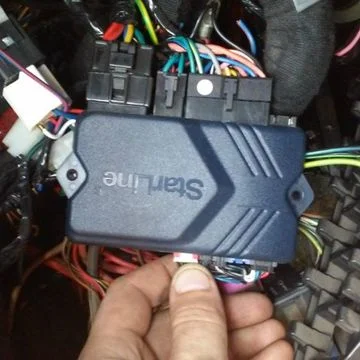
Possible Causes of Malfunction
There are not many reasons why an alarm system might fail. However, it is essential to understand them to know how to disable the alarm on the car. The causes include:
- Radio interference. This is particularly relevant in major cities and areas with a high concentration of vehicles and various electronics. Modern electronic devices are sources of radio waves, which, under certain conditions, can interfere with and jam each other. This also applies to the signals emitted by car alarm fobs. For example, if a car with a faulty alarm emitting its own signal is parked next to yours, it can sometimes interrupt the pulses sent by your "original" fob. To resolve this, try moving closer to the alarm control unit and activating the fob there.
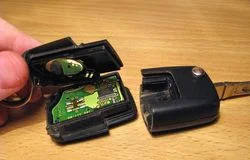
Inside an alarm key fob
- Fob malfunction (remote control failure). This happens quite rarely, but the hypothesis should still be checked. It can occur due to a strong impact, water ingress, or unknown external reasons (failure of internal circuit components). The simplest breakdown in this case is a flat battery. This should be avoided by replacing the power element in the remote in a timely manner. If you have a one-way communication fob, simply press the button and check if the indicator light comes on to diagnose the battery. If it does not, the battery needs replacing. If you use a two-way fob, you will see a battery charge indicator on its display. If you have a spare fob, try using that.
- Car battery drain. In this case, all vehicle systems are powered down, including the alarm. Therefore, it is necessary to monitor the battery charge level, especially in winter. If the battery is indeed flat, you can open the doors with the physical key. However, when you open the door, the alarm system will trigger. Therefore, we recommend opening the bonnet and disconnecting the negative terminal on the battery. To disable the alarm and start the engine, you can try to "jump-start" from another vehicle.
The discussed problems can be resolved in two ways — using the fob or without it. Let's look at them in order.
How to Disable the Alarm Without a Remote
To disable the "alarm" without using a fob, one of two methods is used — emergency deactivation or coded disarmament. In any case, you need to know the location of the Valet button, which allows you to switch the alarm to service mode. Otherwise, it will remain "armed", and you won't be able to approach it without consequences.

Types of "Valet" buttons
You can read about where the "Valet" button is located in your specific vehicle in the manual or ask the technicians who installed the alarm. Typically, installers place them near the fuse box or under the front dashboard (there are also variants where the Valet button is located in the driver's pedal area, behind the glovebox, or under the steering column). If you do not know where the button is, guide yourself by the location of the alarm's LED indicator. If it is installed in the front left part of the cabin, the button will likely be there too. If it's on the right or in the centre, look for the button nearby.
The two presented methods (emergency and coded) are so-called "quick" methods. That is, they can be implemented in a matter of seconds without the need to dig into and sort out the car's wiring. Let's consider these two methods separately.
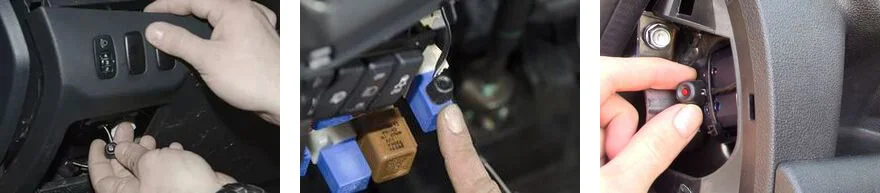
Locations for the "Valet" button
Emergency Disconnection
In this case, to disable the standard alarm, you must know the sequence of actions. Typically, this involves a specific sequence of switching the ignition on and off and pressing the secret Valet button several times. In each individual case, there will be a unique combination (the simplest being to turn the key in the lock and briefly press the button). While you are searching for the secret button and trying to remember the PIN code, to avoid annoying everyone around with the howling of your car, you can at least disconnect the terminal from the battery. The alarm will stop "screaming", and you can determine your next steps in a calm environment — either remove the battery from the fob and squeeze it slightly (sometimes helps if it's flat), or resort to unlocking by entering the code. Below we will look in more detail at combinations for alarm systems popular among motorists.
Coded Disconnection
The term "coded disconnection" comes from the analogue of a PIN code, consisting of 2 to 4 digits known only to the car owner. The procedure goes approximately like this:
- Turn on the ignition.
- Press the "Valet" button the number of times corresponding to the first digit of the code.
- Turn off the ignition.
- Then repeat steps 1–3 for all digits present in the code. This will unlock the system.
How to Physically Disable Car Alarms
The simplest, albeit "uncivilised" and emergency method of disabling the alarm is to cut the wire going to its sound siren with wire cutters. However, this trick usually only works with older alarms. Modern systems have multi-stage protection. Nevertheless, you can try this option. To do this, use the mentioned wire cutters or simply rip the wires out by hand.
Another option is to find the relay or fuse that powers and controls the alarm. The story with the fuse is similar. An old alarm might switch off, but a modern one is unlikely to. As for the relay, finding it is often a difficult task. You need to work backwards to find its location. The situation is complicated by the fact that relays in modern alarms are often contactless and can be located in unexpected places. But if you are lucky enough to find it, disconnecting it from the circuit will not be difficult. This will cut power to the alarm. However, the described methods are more suitable not for emergency deactivation, but for servicing alarm systems. Although it is better to entrust this process to professionals.
Next, we move on to the description of how to disable specific alarms that are popular in our country.
How to Disable "Sheriff"

How to disable "Sheriff" alarm
Let's start with the Sheriff brand, as one of the most common. The unlocking algorithm looks like this:
- open the car interior with the key (mechanically);
- turn on the ignition;
- press the emergency Valet button;
- turn off the ignition;
- turn the ignition on again;
- press the emergency Valet button again.
The result of these actions will be the alarm exiting the alarm mode into service mode, after which you can investigate the cause of the system malfunction.
How to Disable Pantera
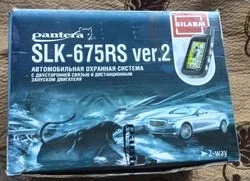
"Pantera" Alarm
The alarm called "Pantera" is disabled using the following algorithm:
- open the car with the key;
- turn on the ignition for a few seconds, then turn it off;
- turn on the ignition;
- hold the Valet service button for 10...15 seconds until the system signals a successful transition to service mode.
How to Disable "Alligator"

"Alligator" alarm kit
Disabling the ALLIGATOR D-810 alarm can be done in two modes — emergency (without using the transmitter) and standard (using the "Valet" button). The choice of coded mode is selected by function No. 9 (see the section in the manual titled "Programmable Features"). The standard disable mode consists of the following steps (with function No. 9 enabled):
- open the car interior with the key;
- turn on the ignition;
- within the next 15 seconds, press the "Valet" button once;
- turn off the ignition.
There is also the possibility of switching the alarm to service mode using a code. You can set this yourself. Any whole numbers in the range from 1 to 99 can be used, except those containing "0". To disarm, you must:
- open the car interior with the key;
- turn on the ignition;
- turn the ignition off and on again;
- within the next 15 seconds, press the "Valet" button the number of times corresponding to the first digit of the code;
- turn the ignition off and on;
- within the next 10...15 seconds, press the "Valet" button the number of times corresponding to the second digit of the code;
- turn the ignition off and on.
Repeat the procedure as many times as there are digits in your code (no more than 4). If you have done it correctly, the alarm will switch to service mode.
Next, let's look at how to disable the ALLIGATOR LX-440 alarm:
- open the cabin door with the key;
- turn on the ignition;
- within the next 10 seconds, press the "Valet" button once;
- turn off the ignition.
After performing these procedures, the alarm will not be in service mode. To unlock using a personal code, proceed similarly to the previous description. However, note that for this alarm, the code consists of only two digits, which can be from 1 to 9. So:
- open the door with the key;
- turn the ignition on, off, and on again;
- after that, within the next 10 seconds, press the "Valet" button the number of times corresponding to the first digit;
- turn the ignition off and on again;
- within 10 seconds, similarly "enter" the second digit using the "Valet" button;
- turn the ignition off and on again.
"Alligator" alarms have a normally open blocking relay. Therefore, simply removing the connector from the alarm control unit to disable it will not work. However, with the STARLINE alarm, this trick will work, as the blocking relay there is normally closed.
How to Disable Starline Alarm

Disabling "Starline" alarm
The sequence of actions for disabling the "Starline 525" alarm:
- open the car interior with the key;
- turn on the ignition;
- hold the Valet button for the next 6 seconds;
- after this, a single beep will appear, confirming the transition to service mode, and the LED indicator will switch to slow flashing mode (lit for about 1 second, off for 5);
- turn off the ignition.
If you have a "Starline" model A6 installed, it can only be unlocked using a code. If a personal code is also set on the models listed above, the algorithm will be as follows:
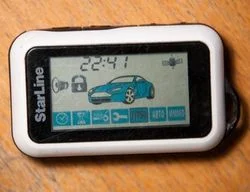
Starline Fob
- open the interior with the key;
- turn on the ignition;
- within the next 20 seconds, press the "Valet" button the number of times corresponding to the first digit of the personal code;
- turn the ignition off and on again;
- again, within 20 seconds, press the "Valet" button the number of times corresponding to the second digit of the personal code;
- turn off the ignition.
Instructions for disabling STARLINE TWAGE A8 and more modern ones:
- open the car with the key;
- turn on the ignition;
- press the "Valet" button 4 times within no more than 20 seconds;
- turn off the ignition.
If you have done everything correctly and the system is functional, you will hear two beeps and see two flashes of the sidelights/parking lights, alerting the driver that the alarm has switched to service mode.
How to Disable Tomahawk Alarm

Disabling "Tomahawk RL950LE" alarm
Let's consider unlocking the "Tomahawk" alarm using the RL950LE model as an example. Proceed in the following sequence:
- open the car with the key;
- turn on the ignition;
- within the next 20 seconds, press the "Valet" button 4 times;
- turn off the ignition.
In case of successful unlocking, the system will notify you with two sound signals and two flashes of the signal lights.
How to Disable "Scher-Khan" Alarm
Let's start the description with the SCHER-KHAN MAGICAR II model. The sequence of actions is as follows:
- open the car with the key;
- within 3 seconds, turn the ignition from the ACC position to ON 4 times;
- turn off the ignition.
If you did everything correctly, the car will turn off the siren as confirmation, the sidelights will flash once, and after 6 seconds, twice more.
Disabling SCHER-KHAN MAGICAR IV is performed according to the following algorithm:
- open the car with the key;
- within the next 4 seconds, turn the ignition from the LOCK position to the ON position 3 times;
- turn off the ignition;
If you did everything correctly, the alarm signal will disappear, and the parking lights will flash once, and after 5 seconds, 2 more times.
If you have SCHER-KHAN MAGICAR 6 installed, it can only be disabled by knowing the code. Upon installation, it is equal to 1111. The sequence of actions is:
- open the car with the key;
- within the next 4 seconds, you must manage to turn the ignition key from the LOCK position to the ON position 3 times;
- turn off the ignition;
- turn the ignition key from the LOCK position to the ON position as many times as the first digit of the code;
- turn off the ignition;
- then repeat the actions for entering all digits of the code, turning off the ignition each time.
If the entered information is correct, then after entering the fourth digit, the alarm will flash the sidelights twice, and the siren will turn off.
If you did not manage to meet the designated time (20 seconds) and find the "Valet" button, let the alarm settle down and calmly search for the mentioned button. Once you have found it, close the door again and repeat the procedure. In this case, you will have enough time to disable the alarm.
How to Disable "Leopard" Alarm
The LEOPARD LS 90/10 EC alarm is similar to the previous case. An emergency alarm removal mode and one using a personal code are possible. In the first case, the actions are similar — open the car, get in, turn on the ignition, and press the "Valet" button 3 times. If you need to enter a code, the actions will be as follows — open the door, turn on the ignition, press the "Valet" button as many times as corresponds to the first digit of the code, turn the ignition off and on, and enter the remaining digits similarly. If you did everything correctly, the alarm will turn off.
Disabling the LEOPARD LR435 alarm occurs similarly to the described case.
How to Disable APS 7000 Alarm
The sequence of actions will be as follows:
- open the car interior with the key;
- disarm the system using the remote;
- turn on the ignition;
- within the next 15 seconds, press and hold the "Valet" button for 2 seconds.
If you did everything correctly, the LED (alarm indicator light) will shine continuously, signalling that the system has been switched to service mode ("Valet" mode).
How to Disable CENMAX Alarm
The sequence for disabling the CENMAX VIGILANT ST-5 brand alarm will be as follows:
- open the door with the key;
- turn on the ignition;
- press the emergency disable button four times;
- turn off the ignition.
Disabling the CENMAX HIT 320 alarm occurs according to this algorithm:
- open the cabin door with the key;
- turn on the ignition;
- press the "Valet" button five times;
- turn off the ignition.
If you did everything correctly, the system will respond with three sound and three light signals.
How to Disable FALCON TIS-010 Alarm
To switch the immobiliser to service mode, you need to know the personal code. Sequence of actions:
- open the door with the key;
- turn on the ignition, while the indicator will light up continuously for 15 seconds;
- when the indicator flashes rapidly, within 3 seconds, you must press the "Valet" button three times;
- after that, the indicator will light up for 5 seconds and begin to flash slowly;
- carefully count the number of flashes, and when their number matches the first digit of the code, press the "Valet" button (the indicator will continue to flash);
- repeat the procedure for all four digits of the code;
- if you entered the information correctly, the indicator will go out, and the system will be switched to service mode.
If you want to leave the vehicle for long-term storage without the alarm function (for example, at a garage or service centre), you can use the built-in "Valet" mode function. For this, the immobiliser has a "disarmed" mode. If you need "Valet" mode specifically, proceed in the following sequence:
- remove the immobiliser from armed mode;
- turn on the ignition;
- within the next 8 seconds, press the "Valet" button three times;
- after 8 seconds, the indicator will light up continuously, which will mean "Valet" mode is on.
How to Disable CLIFFORD Arrow 3
To enable "Valet" mode, you need to enter a code. To do this, adhere to the following sequence of actions:
- press the PlainView 2 switch, located on the dashboard or console of the car, the x1 button the required number of times;
- press the unmarked button (if you need to enter "0", you must press the button immediately).
To enable "Valet" mode, you must:
- turn the ignition key to the "ON" position;
- enter the personal code using the PlainView 2 button;
- hold the unmarked button down for 4 seconds;
- release the button, after which the LED indicator will light up continuously, serving as confirmation that "Valet" mode is enabled.
To disable "Valet" mode you need to:
- turn on the ignition (turn the key to the ON position);
- enter the personal code using the PlainView 2 switch.
If you did everything correctly, the LED indicator will go out.
How to Disable KGB VS-100
To disable the system, perform the following actions:
- open the car door with the key;
- turn on the ignition;
- within 10 seconds, press and release the "Valet" button once;
- the system will disable, and you will be able to start the engine.
How to Disable KGB VS-4000
Disabling this alarm is possible in two modes — emergency and using a personal code. Let's start the description with the first method:
- open the doors with the key;
- turn on the ignition;
- within the next 10 seconds, press and release the "Valet" button.
If you did everything correctly, as confirmation, the siren will give two short sound signals, and the built-in speaker of the fob will give 4 sound signals; the LED icon will flash on its display for 15 seconds.
To unlock the alarm using a personal code, you must:
- open the car door with the key;
- turn on the ignition;
- within the next 15 seconds, press the "Valet" button as many times as corresponds to the first digit of the code (remember that the first press of the button must be no later than 5 seconds after turning on the ignition);
- if you have more than one digit in the code, turn the ignition off and on again and repeat the entry procedure;
- when all digits have been entered, turn the ignition off and on again — the alarm signal will be removed.
Summary
Finally, we would like to draw your attention to the fact that you must find out where the "Valet" button is located in your car. After all, thanks to it, you can independently disable the alarm; clarify this information in advance. If you bought a second-hand car, ask the former owner about the location of the button so that, if necessary, you know how to disable the alarm on the car so the engine starts and you can continue to use it. Also, be sure to find out which alarm is installed on your car and, accordingly, study the sequence of actions for disabling it.
Was this article useful?
Your feedback helps us improve our content.
Related Materials




Discussion (0)
No comments yet!